Docs/Builder Documentation/Meta Builder
Meta Builder
Same flow as the Option Builder: create a metabox, choose its post type, context and priority, then add fields. Values save against each post as post_meta when the post is updated.
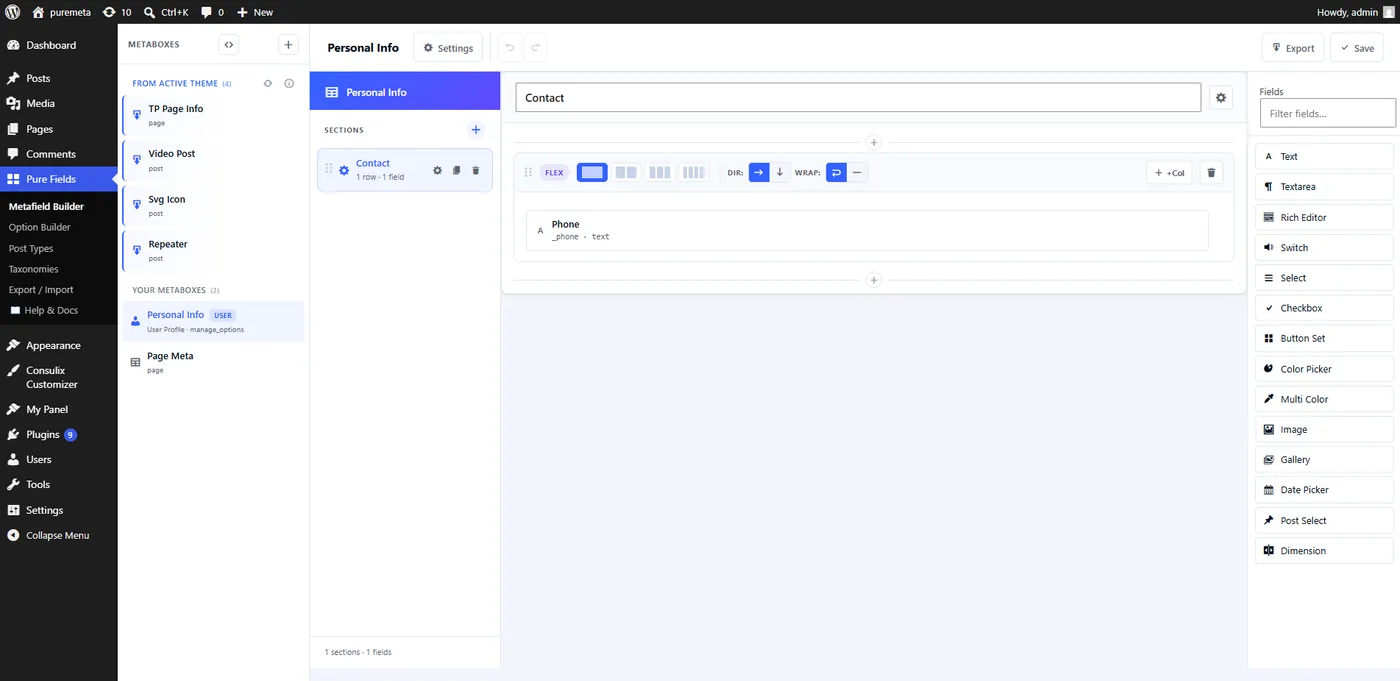
Personal Info one) are built here too.-
Create a metabox
Go to Pure Fields → Metafield Builder → New Metabox. Choose its title, target post type(s), context (normal/side/advanced) and priority.
-
Add fields
Drag fields from the palette into rows, exactly like the Option Builder. Configure each one's label, ID, default and conditional rules.
-
Save
Click Save. The metabox appears immediately on matching post edit screens.
This same screen also builds fields for the Edit Profile screen (like the Personal Info box shown above) — the visual equivalent of the tp_user_meta filter. See Integrations → User Meta for how those values are read back (plain get_user_meta(), not tpmeta_field()).
Every field this builder produces can be hand-written with the tp_meta_boxes filter — see Developer Guide → Registering Meta Fields. Reading the saved values back is identical either way: Helper Functions.