Pure Metafields · Documentation
Custom fields, theme options, and post types — visually or in code.
Pure Metafields (tpmeta) is the ThemePure framework for custom metaboxes, theme option panels, post types and taxonomies. This is the start of the full guide: what the plugin is, how it's put together, and where to go next.
01 · Orientation
What is Pure Metafields?
Pure Metafields (package tpmeta) is a WordPress plugin by ThemePure for building custom metaboxes, theme option panels, custom post types and taxonomies — visually in the admin, or by registering them in code. It adds one top-level admin menu, Pure Fields, and a small set of helper functions for reading the saved values back out in a theme.
Two storage rules explain almost everything: option panel fields save as theme_mods (one per field, so they behave like native theme settings and can mirror into the WordPress Customizer), and metabox fields save as post_meta against the post being edited. Keeping those two apart is the single most useful thing to understand before writing any code — see How the plugin works below.
Read this Introduction, then Getting Started to install the plugin and create your first field. The Developer Guide covers the full coding API; the Builder Documentation covers the no-code visual tools once you know what they're producing under the hood.
02 · Orientation
Key features
One plugin, four builders, and a small set of read helpers for the front end.
Metafield Builder
Visual metaboxes attached to any post type — text, images, repeaters and more, saved to post_meta.
Option Builder
Theme option panels stored as theme_mods, optionally mirrored into the WordPress Customizer.
Post Types & Taxonomies
Register custom post types and taxonomies from the admin, no register_post_type() by hand.
Export / Import + Migrate
Move everything between sites as JSON, bake panels to PHP, or import existing Kirki / Redux code.
The full feature list
- Custom meta boxes — unlimited boxes per post type, with configurable title, placement and priority.
- Flexible field types — text, textarea, select, checkbox, radio, date picker, color picker, gradient, image, gallery, editor, and more (full list: Available Field Types).
- Repeatable fields — let editors add unlimited rows of sub-fields dynamically.
- Conditional logic — show or hide a field based on another field's value (Dynamic Data).
- Theme Options Panel — unlimited panels with a clean admin UI, values readable with
get_theme_mod(). - Visual builders — drag-and-drop admin UI for panels, metaboxes, post types and taxonomies — no PHP required.
- Bake to PHP — export any builder panel to a standalone, committable PHP file.
- WordPress Customizer integration — mirror any option panel into Appearance → Customize with one checkbox.
03 · Orientation
Use cases
What people actually build with it.
Theme options for client sites
One Options Panel for logo, colors, typography and layout switches — clients edit values, not code, and can use the Customizer's live preview.
Per-page/post extra content
A hero metabox with a title, background image and on/off switch; a metabox bound to a post format for audio/video/gallery posts.
Repeating content lists
Team members, testimonials, pricing tiers, FAQ accordions or social links — anything that's "the same group of fields, several times."
Custom content types
A Portfolio or Case Studies post type with its own taxonomy, registered visually without touching register_post_type().
Agency multi-site workflows
Build a panel once, export it as JSON (with saved values) or bake it to PHP, and reuse it across client sites.
Migrating off Kirki or Redux
Paste existing Kirki or Redux registration code into the importer and get back an editable, native Pure Meta panel.
04 · The model
How the plugin works
Two ideas explain almost everything about how data is stored and read back.
1. Options are theme_mods, metaboxes are post_meta
Option Builder panels store one theme_mod per field — not one big serialized blob. That is deliberate: it makes options behave like native theme settings and integrate with the Customizer. Metabox fields store to post_meta against the post being edited.
Option panel value → tpmeta_get_option('field_id') (or get_theme_mod()). Metabox value → tpmeta_field('field_id', $post_id). Mixing them up is the most common mistake — see FAQ.
2. The field id is the storage key
Whatever you set as a field's ID (lowercase, underscores) becomes the literal key you read back — the theme_mod name for options, the meta key for metaboxes. In the builder the ID is auto-derived from the label until you edit it, and is then locked so renaming the label never silently orphans saved data.
Keep IDs short and meaningful (header_logo, footer_columns). They travel with export/import and migration, and they are what your theme templates call.
05 · Orientation
Architecture overview
The plugin adds one top-level menu — Pure Fields — with these screens. (For the underlying file/class structure, see Developer Guide → Plugin Architecture.)
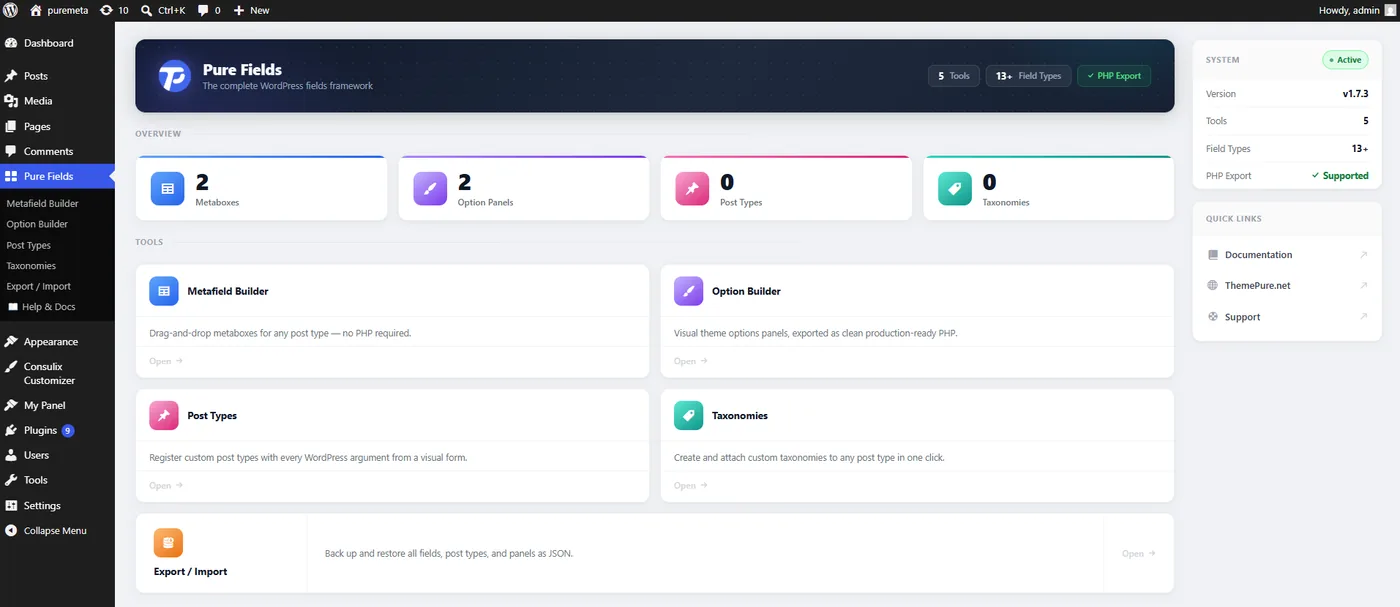
| Screen | What it does |
|---|---|
| Welcome | Dashboard and quick links. |
| Metafield Builder | Build metaboxes (post-meta fields) for post types. |
| Option Builder | Build option panels, import Kirki/Redux, bake to PHP. |
| Post Types | Register and manage custom post types. |
| Taxonomies | Register and manage custom taxonomies. |
| Export / Import | Bulk move all Pure Fields data between sites as JSON. |
| Help & Docs | In-plugin quick reference. |
WordPress 5.6+ (tested to 6.9) on PHP 8.0+. Full install steps: Getting Started.