Docs/Tutorials/Move Data Between Sites
Move Data Between Sites
Pure Fields → Export / Import moves your whole configuration — and the saved values — as a single JSON file. Useful for agencies rolling the same setup out to several client sites.
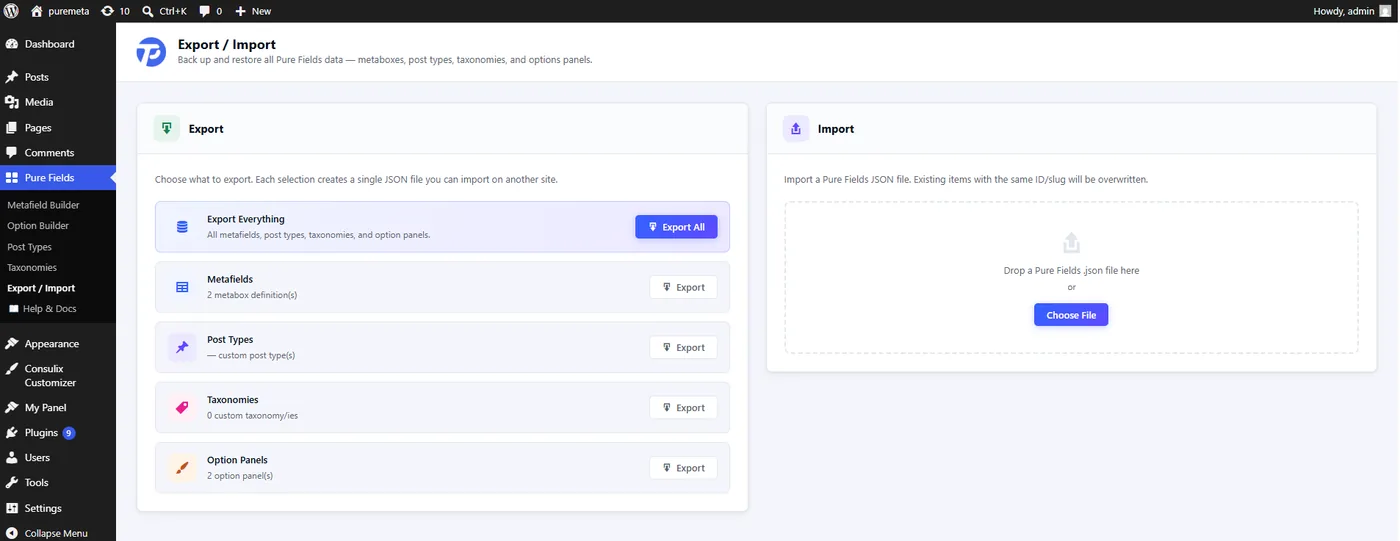
.json on the right to import. Items with a matching ID/slug are overwritten.What's included
| Data type | Carries |
|---|---|
| Metafields | All metabox definitions built in the Meta Builder. |
| Post Types | Registered custom post types. |
| Taxonomies | Registered custom taxonomies. |
| Options | Option panels plus their saved theme_mod values and cross-site portability hints (e.g. post-select slug→ID maps). |
-
Export on the source site
Open Pure Fields → Export / Import, tick the data types, and download the JSON. The option bundle includes real saved values, not just the schema.
-
Import on the target site
Paste or upload the JSON on the destination. Definitions are recreated and option values are re-applied; post-select references are remapped to matching posts where possible.
-
Read the result counts
The importer reports imported / failed per type and a values summary — e.g. "12 panels imported, 147 saved values restored, 3 remapped, 1 skipped."
Each type imports up to 500 items per run. Re-importing an identical package is safe — unchanged items still count as success rather than failing. Requires the manage_options capability.
Per-panel JSON (Option Builder)
Inside the Option Builder you can export or import a single panel as a .json file — drag-and-drop it onto the builder's drop zone to restore it instantly. Handy for sharing one panel without moving everything.
Export/Import moves a live configuration between running sites. If you want a panel committed to version control as code instead, see Ship a Panel as Code.